How to Update Credit Card/Debit Card Information in CCO Academy (Circle)
Log in to your CCO Academy account at https://www.cco.academy/
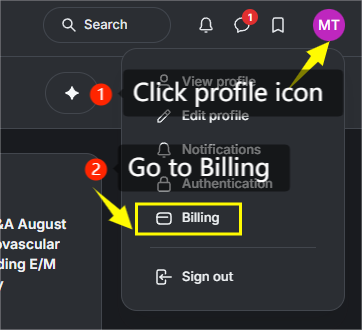
On the top-right, click your profile icon to open the dropdown menu. Click Billing.
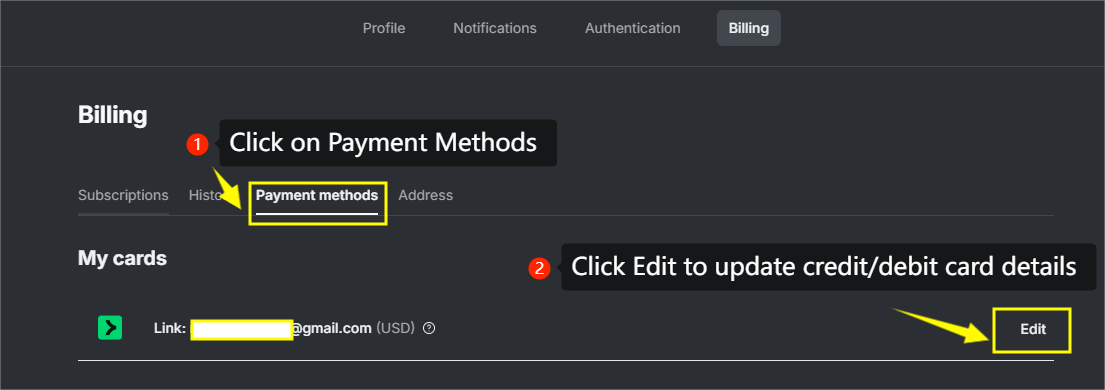
Click on Payment Methods to show exisiting debit/credit card or other payment methods for information update. Click "Edit" on the right side.
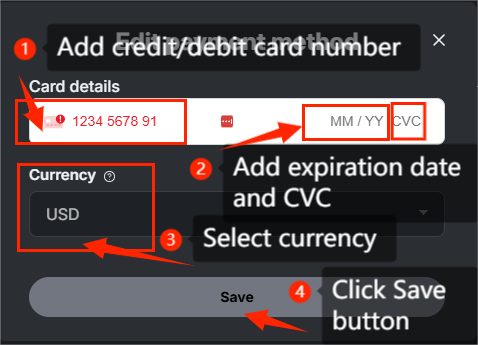
Enter your new debit/credit card details (Debit/Credit Card number, expiration date MM/YY and CVC) or other new payment method details. Select preferred Currency. Lastly, click the SAVE button.
Note: If you have subscribed PRIOR to July 4th, 2025, visit the previous billing system at billing.cco.us. Cancel your existing subscription/old billing there. Then, log in to your CCO Academy account to start using the new CCO Academy billing. If you need billing assistance, please message (DM) the helpdesk on the CCO Academy.